0%

快捷键

查看类的结构

方法1:

  • Windows: alt + 7
  • Mac:cmd + 7

方法2:

  • Windows:ctrl + F12
  • Mac:cmd + F12

查看继承关系

  • Windows:ctrl + h
  • Mac:control + h

查看类和接口被哪些子类实现的快捷键

Ctrl+alt +B

Android studio 下载安装

java环境配置

java下载

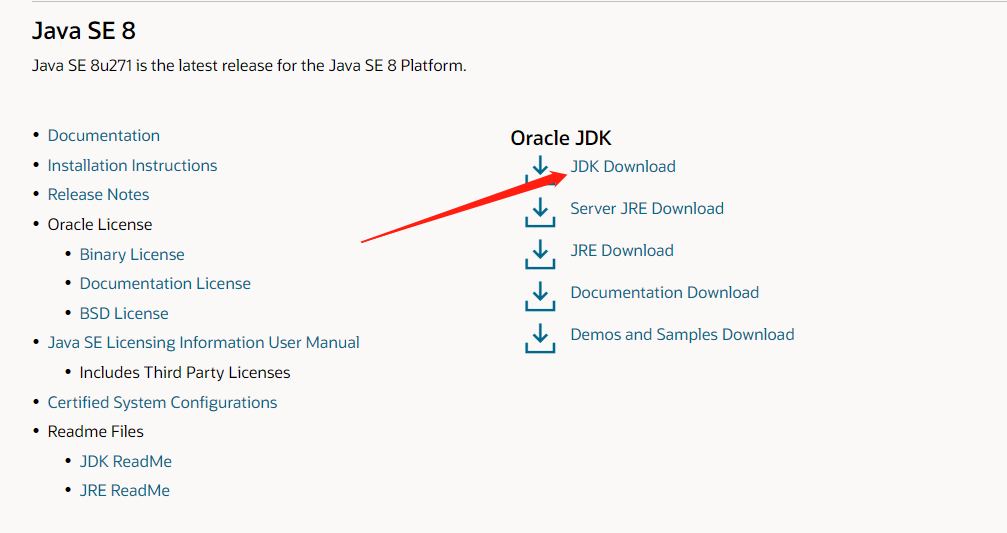
Oracle官网下载自己需要的java版本

图片

我这里选择的是windows的jdk8

图片

ps:下载需要登录自己Oracle账号,注册登录一下就行

下载之后的exe文件双击开,安装到你需要安装的位置即可,我这里安装位置是

D:\Program Files\Java\jdk1.8.0_271

环境配置

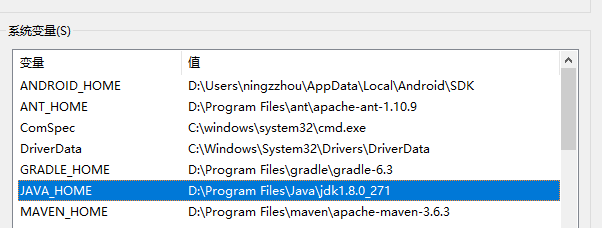
在系统变量里面加入了变量JAVA_HOME,值为安装的位置

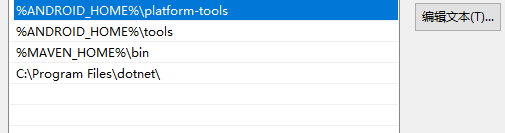
然后在Path里面加入了%JAVA_HOME%\bin%JAVA_HOME%\jre\bin(这个有待商量)

测试

在cmd当中输入java -versionjavac -version查看输出,如果有如下的输出说明配置正确

java -version:

1
2
3
java version "1.8.0_271"
Java(TM) SE Runtime Environment (build 1.8.0_271-b09)
Java HotSpot(TM) 64-Bit Server VM (build 25.271-b09, mixed mode)

javac -version:

1
javac 1.8.0_271

Android studio下载和安装

android studio下载

直接去官网,下载installer.exe或者zip都可以,我这里是下载的zip。

然后找个合适的位置解压,解压完之后是这个样子
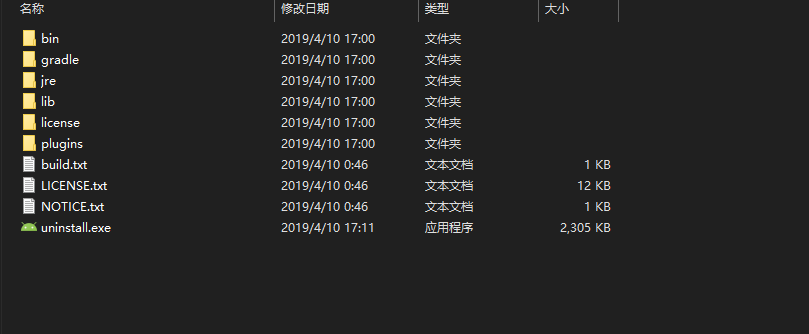
我们进入bin文件点击studio64.exe就可以运行
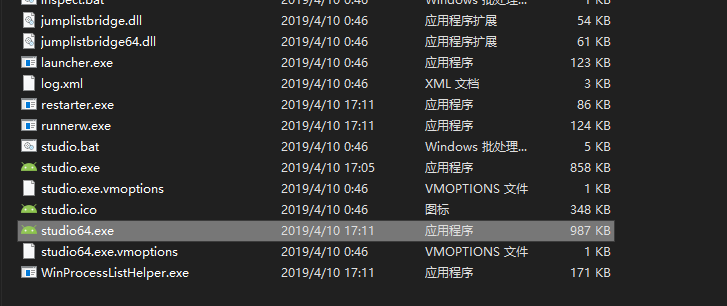
第一次运行

第一次运行可能会下载一些sdk等东西,这里的话只需要记得更改sdk下载位置,别下载到c盘就行。
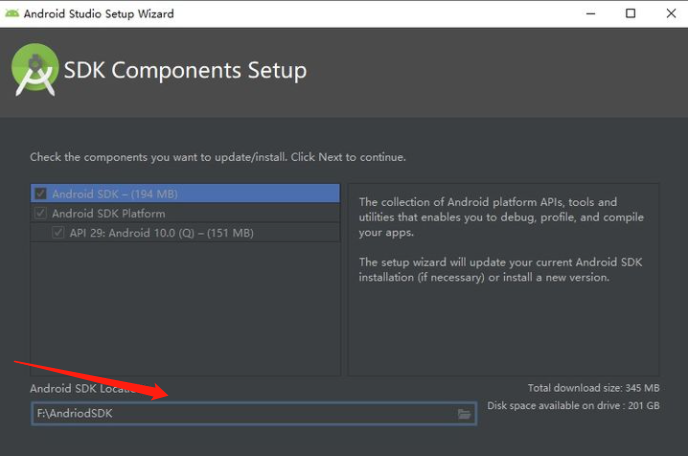
ps:网络可能会导致很难下载下来,这个可以通过设置镜像等方法解决

Android环境配置

Android 环境配置主要配置sdk的环境变量,跟上面java环境配置类似,在系统变量中加入ANDROID_HOME对应着sdk安装位置
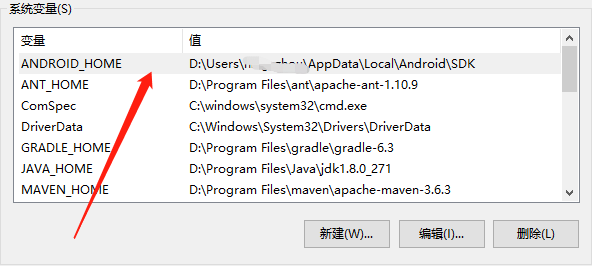
然后在path当中加入%ANDROID_HOME%\platform-tools%ANDROID_HOME%\tools

测试

在cmd当中输入adb,然后输出类似如下信息

1
2
3
4
5
6
7
Android Debug Bridge version 1.0.41
Version 30.0.5-6877874
Installed as D:\Users\ningzzhou\AppData\Local\Android\SDK\platform-tools\adb.exe

global options:
-a listen on all network interfaces, not just localhost
-d use USB device (error if multiple devices connected)

更多环境变量配置可以参考官网:https://developer.android.com/studio/command-line/variables?hl=zh-cn

小结

Android studio因为经常需要安装,所以记录一下

spring中ioc创建对象的方法

介绍

最近在学习spring,学了又忘,忘了又学,还是需要做做总结,动动手知识才能变成自己的。

创建对象的方法

我们的需求是创建一个User的对象,其中User只有一个属性name

1.无参构造方法

User代码:

1
2
3
4
5
6
7
8
9
10
11
12
13
14
15
16
17
18
19
package com.zhouning.spring.beans;

public class User {

private String name;

public User() {
System.out.println("调用了无参构造方法");
}

public void setName(String name) {
this.name = name;
}

public void show(){
System.out.println("你好:"+name);
}
}

bean.xml

1
2
3
4
5
6
7
8
9
<?xml version="1.0" encoding="UTF-8"?>
<beans xmlns="http://www.springframework.org/schema/beans"
xmlns:xsi="http://www.w3.org/2001/XMLSchema-instance"
xsi:schemaLocation="http://www.springframework.org/schema/beans http://www.springframework.org/schema/beans/spring-beans.xsd">
<bean id="user" class="com.zhouning.spring.beans.User">
<!-- 通过无参的方法创建对象-->
<property name="name" value="张三"></property>
</bean>
</beans>

调用:

1
2
3
4
5
6
public static void main(String[] args) {
ApplicationContext applicationContext = new ClassPathXmlApplicationContext("bean.xml");
User user = (User) applicationContext.getBean("user");
user.show();

}

输出:

1
2
调用了无参构造方法
你好:张三

需要注意的点:

  • 调用无参的方法,则类里面需要有set方法才能对属性进行设置
  • 构造的属性设置<property name="name" value="张三"></property>中,name="name",这个引号中的name是对应的set方法去掉set后第一个字母小写(当然大写也可以),如:我这里面的set方法是setNmae,所以对应name="name";如果set方法是setNName,则对应的写法是name="NName"
  • 方法名尽量符合规范,这样在配置的时候也好写一些

2.有参的构造方法

User代码:

1
2
3
4
5
6
7
8
9
10
11
12
13
14
15
16
package com.zhouning.spring.beans;

public class User {

private String name;

public User(String name) {
System.out.println("调用了有参构造方法");
this.name = name;
}

public void show(){
System.out.println("你好:"+name);
}
}

  • 根据参数下标来设置
1
2
3
4
5
6
7
8
9
<?xml version="1.0" encoding="UTF-8"?>
<beans xmlns="http://www.springframework.org/schema/beans"
xmlns:xsi="http://www.w3.org/2001/XMLSchema-instance"
xsi:schemaLocation="http://www.springframework.org/schema/beans http://www.springframework.org/schema/beans/spring-beans.xsd">
<bean id="user" class="com.zhouning.spring.beans.User">
<!-- 根据参数下标-->
<constructor-arg index="0" value="李四"></constructor-arg>
</bean>
</beans>
  • 根据参数类型
1
2
3
4
5
6
7
8
9
<?xml version="1.0" encoding="UTF-8"?>
<beans xmlns="http://www.springframework.org/schema/beans"
xmlns:xsi="http://www.w3.org/2001/XMLSchema-instance"
xsi:schemaLocation="http://www.springframework.org/schema/beans http://www.springframework.org/schema/beans/spring-beans.xsd">
<bean id="user" class="com.zhouning.spring.beans.User">
<!-- 根据参数类型-->
<constructor-arg type="java.lang.String" value="李四"></constructor-arg>
</bean>
</beans>
  • 根据参数名字
1
2
3
4
5
6
7
8
9
<?xml version="1.0" encoding="UTF-8"?>
<beans xmlns="http://www.springframework.org/schema/beans"
xmlns:xsi="http://www.w3.org/2001/XMLSchema-instance"
xsi:schemaLocation="http://www.springframework.org/schema/beans http://www.springframework.org/schema/beans/spring-beans.xsd">
<bean id="user" class="com.zhouning.spring.beans.User">
<!-- 根据参数名字-->
<constructor-arg name="name" value="李四"></constructor-arg>
</bean>
</beans>

这三种方法最后的输出都是:

1
2
调用了有参构造方法
你好:李四
  • 需要注意的是这三种方法可以合在一起使用,如<constructor-arg name="name" value="李四" type="java.lang.String"></constructor-arg>,这样可以应对有点时候类型不确定等情况。

3.通过工厂方法

  • 静态工厂

    创建静态工厂类UserFactory:

    1
    2
    3
    4
    5
    6
    7
    8
    /**
    * 静态工厂
    */
    public class UserFactory {
    public static User newInstance(String name){
    return new User(name);
    }
    }

    bean.xml:

    1
    2
    3
    4
    5
    6
    7
    8
    9
    <?xml version="1.0" encoding="UTF-8"?>
    <beans xmlns="http://www.springframework.org/schema/beans"
    xmlns:xsi="http://www.w3.org/2001/XMLSchema-instance"
    xsi:schemaLocation="http://www.springframework.org/schema/beans http://www.springframework.org/schema/beans/spring-beans.xsd">
    <bean id="user" class="com.zhouning.spring.factory.UserFactory" factory-method="newInstance">
    <!-- 通过工厂类创建对象-->
    <constructor-arg name="name" value="王五"></constructor-arg>
    </bean>
    </beans>
  • 动态工厂

    创建动态工厂类UserDynamicFactory:

    1
    2
    3
    4
    5
    public class UserDynamicFactory {
    public User newInstance(String name){
    return new User(name);
    }
    }

    bean.xml:

    1
    2
    3
    4
    5
    6
    7
    8
    9
    10
    <?xml version="1.0" encoding="UTF-8"?>
    <beans xmlns="http://www.springframework.org/schema/beans"
    xmlns:xsi="http://www.w3.org/2001/XMLSchema-instance"
    xsi:schemaLocation="http://www.springframework.org/schema/beans http://www.springframework.org/schema/beans/spring-beans.xsd">
    <bean id="userFactory" class="com.zhouning.spring.factory.UserDynamicFactory"></bean>
    <bean id="user" factory-bean="userFactory" factory-method="newInstance">
    <!-- 通过工厂类创建对象-->
    <constructor-arg name="name" value="王五"></constructor-arg>
    </bean>
    </beans>

需要注意的地方:

  • 动态跟静态工厂的方法类似,区别在于动态工厂需要先创建工厂后再使用
  • 两者使用的都不多

总结

spring中ioc创建对象的方法总共是三类6种,总结一下。千里之行始于足下,加油!

Spring配置文件

介绍

对自己学习的spring的简单配置做一下小总结,后面有可以继续加

一、设置别名

bean.xml

1
2
3
4
5
6
7
8
9
10
11
<?xml version="1.0" encoding="UTF-8"?>
<beans xmlns="http://www.springframework.org/schema/beans"
xmlns:xsi="http://www.w3.org/2001/XMLSchema-instance"
xsi:schemaLocation="http://www.springframework.org/schema/beans http://www.springframework.org/schema/beans/spring-beans.xsd">
<!-- 有了id-->
<bean id="user" name="u2 u3,u4;u5" class="com.zhouning.spring.beans.User">
<constructor-arg index="0" value="张三"></constructor-arg>
</bean>
<!-- 设置别名-->
<alias name="user" alias="u1"></alias>
</beans>
  • idbean的标识符,如果设置需要唯一(就是说不能同时设置两个id一样的bean)。
  • 如果没有设置id,但是设置了name,那么namebean的默认标识符(充当id的作用)。
  • 如果又设置了id,又设置了name那么name就是别名,这时可以设置多个别名,使用分隔符空格、逗号、分号隔开。
  • alias也是设置别名用的,用法如上。
  • 如果不配置id也不配置name,那么可以根据applicationContext.getBean(class)获取对象。

二、通过import导入别人的配置文件

1
<import resource="applicationContext.xml"></import>

这个是在团队协作的时候使用的

总结

目前就只写了,两个以后需要注意的时候再慢慢加。

spring依赖注入

简介

主要对spring当中各种各样数据注入的讲解,比如:数组、List、Map、Set等,他们的注入方法有相同的地方也有一些简单的区别,自己手动写一下方便后面忘记了。

各种类型的注入

我们的需求是设计一个学生类,然后学生的信息有姓名、地址、书本、爱好等

Student代码如下:

1
2
3
4
5
6
7
8
9
10
11
12
13
14
15
16
17
18
19
20
21
22
23
24
25
26
27
28
29
30
31
32
33
34
35
36
37
38
39
40
41
42
43
44
45
46
47
48
49
50
51
52
53
54
/***
*
* @author zhouning
* books 代表拥有的书
* grade 代表成绩
* games 代表喜欢的游戏
* properties 代表属性
*/
public class Student {
private String name;
private Address address;
private String[] books;
private List<String> hobbies;
private Map<String,Integer> grade;
private Set<String>games;
private String phoneNumber;
private Properties properties;


public void setProperties(Properties properties) {
this.properties = properties;
}

public void setPhoneNumber(String phoneNumber) {
this.phoneNumber = phoneNumber;
}

public void setGames(Set<String> games) {
this.games = games;
}

public void setHobbies(List<String> hobbies) {
this.hobbies = hobbies;
}

public void setBooks(String[] books) {
this.books = books;
}

public void setAddress(Address address) {
this.address = address;
}

public void setName(String name) {
this.name = name;
}

public void setGrade(Map<String, Integer> grade) {
this.grade = grade;
}

public Student() {}
}

其中Address代码:

1
2
3
4
5
6
7
8
9
10
11
12
13
14
15
16
17
18
public class Address {
String addr;

public String getAddr() {
return addr;
}

public void setAddr(String addr) {
this.addr = addr;
}

@Override
public String toString() {
return "Address{" +
"addr='" + addr + '\'' +
'}';
}
}

配置文件:

1
2
3
4
5
6
7
8
9
10
11
12
13
14
15
16
17
18
19
20
21
22
23
24
25
26
27
28
29
30
31
32
33
34
35
36
37
38
39
40
41
42
43
44
45
46
47
48
49
50
51
52
53
54
55
56
57
58
59
60
61
62
63
64
65
66
67
<?xml version="1.0" encoding="UTF-8"?>
<beans xmlns="http://www.springframework.org/schema/beans"
xmlns:xsi="http://www.w3.org/2001/XMLSchema-instance"
xmlns:p="http://www.springframework.org/schema/p"
xmlns:c="http://www.springframework.org/schema/c"
xsi:schemaLocation="http://www.springframework.org/schema/beans http://www.springframework.org/schema/beans/spring-beans.xsd">
<!-- 地址-->
<bean id="addr" class="com.zhouning.Address" >
<property name="addr" value="武汉"/>
</bean>

<bean id="student" class="com.zhouning.Student" >
<!-- 对于普通的变量“name”进行注入-->
<property name="name" value="张三"></property>
<!-- 对于bean的注入-->
<property name="address" ref="addr"></property>
<!-- 对于数组的注入-->
<property name="books">
<array>
<value>C++入门到精通</value>
<value>java入门到精通</value>
<value>mysql数据库讲解</value>
<value>数据结构和算法</value>
</array>
</property>
<!-- 对于list注入-->
<property name="hobbies">
<list>
<value>写代码</value>
<value>看书</value>
<value>打球</value>
</list>
</property>
<!-- 对于map注入-->
<property name="grade">
<map>
<entry key="高数" value="85"></entry>
<entry>
<key><value>面向对象</value></key>
<value>87</value>
</entry>
</map>
</property>
<!-- 对于set的注入-->
<property name="games">
<set>
<value>LoL</value>
<value>DNF</value>
</set>
</property>
<!-- null注入-->
<property name="phoneNumber" >
<null></null>
</property>

<property name="properties">
<props>
<prop key="学号">20171001111</prop>
<prop key="专业">计算机和科学</prop>
</props>
</property>
</bean>
<!-- p命名空间注入-->
<bean id="addr1" class="com.zhouning.Address" p:addr="北京"></bean>
<!-- c命名空间注入-->
<bean id="addr2" class="com.zhouning.Address" c:addr="上海"></bean>
</beans>

一、常量注入

1
2
<!--        对于普通的变量“name”进行注入-->
<property name="name" value="张三"></property>

常量注入是对普通类型的注入,比如:String、int、float等

二、bean注入

1
2
<!--        对于bean的注入-->
<property name="address" ref="addr"></property>

bean的注入是先创建其他的bean,然后使用ref进行引用注入

三、数组注入

1
2
3
4
5
6
7
8
9
<!--        对于数组的注入-->
<property name="books">
<array>
<value>C++入门到精通</value>
<value>java入门到精通</value>
<value>mysql数据库讲解</value>
<value>数据结构和算法</value>
</array>
</property>

数组注入比较简单

四、List注入

1
2
3
4
5
6
7
8
<!--        对于list注入-->
<property name="hobbies">
<list>
<value>写代码</value>
<value>看书</value>
<value>打球</value>
</list>
</property>

注入比较简单

五、Map注入

1
2
3
4
5
6
7
8
9
10
<!--        对于map注入-->
<property name="grade">
<map>
<entry key="高数" value="85"></entry>
<entry>
<key><value>面向对象</value></key>
<value>87</value>
</entry>
</map>
</property>

Map注入时元素是entry,然后分别对entry里面的key和value注入就行

六、Set注入

1
2
3
4
5
6
7
<!--        对于set的注入-->
<property name="games">
<set>
<value>LoL</value>
<value>DNF</value>
</set>
</property>

set注入和前面的数组和list注入差不多

七、null注入

1
2
3
4
<!--        null注入-->
<property name="phoneNumber" >
<null></null>
</property>

null注入九比较鸡肋了,一般来说你不注入他本身也应该是null

八、Properties注入

1
2
3
4
5
6
7
<!--        Properties注入-->
<property name="properties">
<props>
<prop key="学号">20171001111</prop>
<prop key="专业">计算机和科学</prop>
</props>
</property>

Properties类似于Map的配置

九、p命名空间注入

1
2
<!--    p命名空间注入-->
<bean id="addr1" class="com.zhouning.Address" p:addr="北京"></bean>

p命名空间的注入需要添加一下xmlns:p="http://www.springframework.org/schema/p",p其实是属性的意思。

十、c命名空间注入

1
2
<!--    c命名空间注入-->
<bean id="addr2" class="com.zhouning.Address" c:addr="上海"></bean>

c命名空间注入需要添加一下xmlns:c="http://www.springframework.org/schema/c",c命名空间注入需要有构造函数的支撑,c就是构造函数的意思。

总结

总结一下学习的spring的注入方法,其中如果对属性进行注入一定需要有Set方法,如果对构造函数进行注入,则一定有对应的构造方法,继续学习spring当中。

spring中bean的作用域

简介

spring中的bean有作用域的限制,平时我们可能不经常使用,但是作为学习我们还是需要学习一下

讲解

平时我们创建spring的时候可能如下:

1
2
3
<bean id="user" class="com.zhouning.spring.beans.User" scope="singleton">
<constructor-arg index="0" value="张三"></constructor-arg>
</bean>

其中scope代表的就是作用域,作用域比较常见的有:singleton、prototype等

  • singleton

    单例,整个容器当中只有一个对象的实例,默认情况下bean的作用域就是单例

  • prototype

    原型,每次获取bean都会产生一个新的对象

  • request

    每次请求时都会创建一个新的对象

  • session

    在会话范围内时一个对象

  • global session

    只在portlet下有用

  • application

    在应用范围中一个对象

spring中bean的自动装配

简介

为了解决bean每次都配置的那么麻烦,spring提供了一个自动装配的功能,个人感觉功能页有一些鸡肋

讲解

假设我们有一个User类,然后里面有两个属性分别是名字和地址

User:

1
2
3
4
5
6
7
8
9
10
11
12
13
14
15
16
17
18
19
20
21
22
23
24
25
26
27
28
package com.zhouning.spring.beans;

public class User {

private String name;
private Address address;

public void setName(String name) {
this.name = name;
}
public User() {}
public User(Address address) {
this.address = address;
}

public void setAddress(Address address) {
this.address = address;
}

@Override
public String toString() {
return "User{" +
"name='" + name + '\'' +
", address=" + address +
'}';
}
}

Address:

1
2
3
4
5
6
7
8
9
10
11
12
13
14
15
16
17
18
19
20
21
22
23
24
package com.zhouning.spring.beans;

public class Address {
String addr;

@Override
public String toString() {
return "Address{" +
"addr='" + addr + '\'' +
'}';
}

public void setAddr(String addr) {
this.addr = addr;
}

public Address() {
}

public Address(String addr) {
this.addr = addr;
}
}

三种方法:

  • byName

    根据名称(set方法)去查找对应的bean,如果有则装配

    1
    2
    3
    4
    5
    6
    7
    8
    9
    10
    11
    12
    13
    <?xml version="1.0" encoding="UTF-8"?>
    <beans xmlns="http://www.springframework.org/schema/beans"
    xmlns:xsi="http://www.w3.org/2001/XMLSchema-instance"
    xsi:schemaLocation="http://www.springframework.org/schema/beans http://www.springframework.org/schema/beans/spring-beans.xsd">

    <bean id="address" class="com.zhouning.spring.beans.Address" >
    <property name="addr" value="武汉"></property>
    </bean>

    <bean id="user" class="com.zhouning.spring.beans.User" autowire="byName">
    <property name="name" value="张三"></property>
    </bean>
    </beans>

    对应着User里面的public void setAddr(String addr)

  • byType

    更加类型进行自动装配,不需要管bean的id,但是一种类型的bean只能有一个,不然会报错。

    1
    2
    3
    4
    5
    6
    7
    8
    9
    10
    11
    12
    13
    <?xml version="1.0" encoding="UTF-8"?>
    <beans xmlns="http://www.springframework.org/schema/beans"
    xmlns:xsi="http://www.w3.org/2001/XMLSchema-instance"
    xsi:schemaLocation="http://www.springframework.org/schema/beans http://www.springframework.org/schema/beans/spring-beans.xsd">

    <bean id="address" class="com.zhouning.spring.beans.Address" >
    <property name="addr" value="武汉"></property>
    </bean>

    <bean id="user" class="com.zhouning.spring.beans.User" autowire="byType">
    <property name="name" value="张三"></property>
    </bean>
    </beans>

    对应着User里面的public void setAddr(String addr)

  • constructor

    当构造器实例化时,进行自动装配,需要有对应的构造函数

    1
    2
    3
    4
    5
    6
    7
    8
    9
    10
    11
    12
    13
    <?xml version="1.0" encoding="UTF-8"?>
    <beans xmlns="http://www.springframework.org/schema/beans"
    xmlns:xsi="http://www.w3.org/2001/XMLSchema-instance"
    xsi:schemaLocation="http://www.springframework.org/schema/beans http://www.springframework.org/schema/beans/spring-beans.xsd">

    <bean id="address" class="com.zhouning.spring.beans.Address" >
    <property name="addr" value="武汉"></property>
    </bean>

    <bean id="user" class="com.zhouning.spring.beans.User" autowire="constructor">
    <property name="name" value="张三"></property>
    </bean>
    </beans>

    对应着User里面的public User(Address address)

总结

bean在xml中的自动注入都是通过这种方法,但是感觉不是很常用。

spring中AOP个人总结

简介

aop(aspect oriented programming)面向切面编程是spring当中一个重要内容,在学习之后感觉这个思想挺不错的,做个总结

AOP讲解

一、面向切面编程

​ 听说过面向对象编程(oop),但是面向切面编程还真是第一次听说,那面向切面编程到底是什么呢?

​ 面向切面编程是一种横向的编程方式,横向是一种平行的意思。在spring当中有很多的竖向的图,如下:

aop1

action中会调用到serviceservice当中会调用到dao,这样的类似一层一层的在spring当中认为是一种竖向编程,竖向编程结构清晰。

​ 横向编程类似于下面这种,在servicelog是两个模块,两者独立,但是在service调用的时候,希望能够通过log模块打印日志信息,我们将l当作一个切面横插进去,就是一种横向编程的思维。

奥普

​ 这样编程的好处就是真实角色处理的业务更加纯粹,不用去关注一些公共的事情(如:日志、安全、缓存等),其实和前面所讲的java代理的作用相同。

二、相对应的概念

  • 关注点(Pointcuts):增加的某个业务,比如:日志、安全、缓存、事务等。
  • 切面(Aspect):一个关注点的模块。
  • 通知(Advice):在切面的某个特定的连接点上执行的动作,通知有前置通知、后置通知、返回通知、异常通知、环绕通知。
    • 前置通知:发生在方法执行调用之前
    • 返回通知:方法运行之后,得到结果返回后
    • 后置通知:发生在返回通知之后
    • 异常通知:运算异常才有的通知
    • 环绕通知:可以得到上面所有的通知
  • 织入(Weaving):把切面连接道应用程序上,比如:把llog连接到seervice上。

三、代码实现

代码实现都是使用idea作为ide实现的,其中怎么创建可以参考这篇文章,然后我们目前的需求就是创建一个ArithmeticCalculator进行加减乘除,然后在ArithmeticCalculator里面插入log

先创建接口ArithmeticCalculator

1
2
3
4
5
6
7
8
9
10
11
12
13
14
package com.zhouning;

/**
* @author zhouning
*/
public interface ArithmeticCalculator {

int add(int i, int j);
int sub(int i, int j);
int mul(int i, int j);
int div(int i, int j);
}


使用类去实现

1
2
3
4
5
6
7
8
9
10
11
12
13
14
15
16
17
18
19
20
21
22
23
24
25
26
27
28
29
30
package com.zhouning;

/**
* @author zhouning
*/
public class ArithmeticCalculatorImpl implements ArithmeticCalculator{
@Override
public int add(int i, int j) {
int result = i + j;
return result;
}

@Override
public int sub(int i, int j) {
int result = i - j;
return result;
}

@Override
public int mul(int i, int j) {
int result = i * j;
return result;
}

@Override
public int div(int i, int j) {
int result = i / j;
return result;
}
}
  1. 通过springAPI来实现

    API实现的话我们首先需要实现相对应的接口,如:MethodBeforeAdvice(前置通知),可以参考官方文档上的接口介绍,我这里实现的是前置通知的接口。

    Log:

    1
    2
    3
    4
    5
    6
    7
    8
    9
    10
    11
    12
    13
    14
    15
    16
    17
    18
    19
    20
    21
    22
    23
    24
    25
    26
    package com.zhouning.log;

    import org.springframework.aop.MethodBeforeAdvice;

    import java.lang.reflect.Method;

    /**
    * @author zhouning
    */
    public class Log implements MethodBeforeAdvice {


    /**
    *
    * @param method 被调用的方法对象
    * @param args 被调用的方法参数
    * @param o 被调用方法的目标参数
    * @throws Throwable
    */
    @Override
    public void before(Method method, Object[] args, Object o) throws Throwable {
    System.out.println(o.getClass().getName()+"的"+method.getName()+"方法被调用");

    }
    }

    对应的配置:

    1
    2
    3
    4
    5
    6
    7
    8
    9
    10
    11
    12
    13
    14
    15
    <?xml version="1.0" encoding="UTF-8"?>
    <beans xmlns="http://www.springframework.org/schema/beans"
    xmlns:xsi="http://www.w3.org/2001/XMLSchema-instance" xmlns:aop="http://www.springframework.org/schema/aop"
    xsi:schemaLocation="http://www.springframework.org/schema/beans http://www.springframework.org/schema/beans/spring-beans.xsd
    http://www.springframework.org/schema/aop
    http://www.springframework.org/schema/aop/spring-aop.xsd">

    <bean id="arithmeticCalculator" class="com.zhouning.ArithmeticCalculatorImpl"></bean>
    <bean id="log" class="com.zhouning.log.Log" ></bean>
    <aop:config>
    <aop:pointcut id="pointcut" expression="execution(* com.zhouning.ArithmeticCalculatorImpl.*(..))"/>
    <aop:advisor advice-ref="log" pointcut-ref="pointcut"></aop:advisor>
    </aop:config>

    </beans>

    调用:

    1
    2
    3
    4
    5
    6
    7
    8
    public static void main(String[] args) {
    ApplicationContext applicationContext = new ClassPathXmlApplicationContext("bean.xml");
    ArithmeticCalculator arithmeticCalculator = (ArithmeticCalculator) applicationContext.getBean("arithmeticCalculator");
    arithmeticCalculator.add(1, 1);
    System.out.println("-------------------------------------");
    arithmeticCalculator.sub(10, 0);

    }

    输出:

    1
    2
    3
    com.zhouning.ArithmeticCalculatorImpl的add方法被调用
    -------------------------------------
    com.zhouning.ArithmeticCalculatorImpl的sub方法被调用

需要注意的点:

  • spring—aop需要的包一定要导入正确,开始我有个包没有导入,导致弄了半天

  • 一定要在xsi:schemaLocation上加入http://www.springframework.org/schema/aop http://www.springframework.org/schema/aop/spring-aop.xsd

  • 表达式execution()中参数介绍:第一个*代表返回值不限;第二个*代表方法;括号中的..代表参数

  • 这种直接使用SpringAPI的方法使用不多

  1. 自定义类实现(基于配置文件)

    第一种方法虽然也能够使用,但是用起来还是比较麻烦的,如果通知多了继承的接口也会增加,所以采取自定义类的方法要简单一些。

    新建一个LoggingAspect:

    1
    2
    3
    4
    5
    6
    7
    8
    9
    10
    11
    12
    13
    14
    15
    16
    17
    18
    19
    20
    21
    22
    23
    24
    25
    26
    27
    28
    29
    30
    31
    32
    33
    34
    35
    36
    37
    38
    39
    40
    41
    42
    43
    44
    45
    46
    47
    48
    49
    50
    51
    52
    53
    54
    55
    56
    57
    58
    59
    60
    61
    62
    63
    64
    65
    66
    67
    68
    69
    70
    71
    72
    73
    74
    75
    76
    77
    78
    79
    package com.zhouning.log;

    import org.aspectj.lang.JoinPoint;
    import org.aspectj.lang.ProceedingJoinPoint;
    import org.aspectj.lang.annotation.Around;

    import java.util.Arrays;

    public class LoggingAspect {
    /**
    * 前置通知
    * @param joinPoint 连接点
    */
    public void beforeMethod(JoinPoint joinPoint){
    String methodName = joinPoint.getSignature().getName();
    Object [] args = joinPoint.getArgs();

    System.out.println("前置通知: The method " + methodName + " begins with " + Arrays.asList(args));
    }

    /***
    * 后置通知
    * @param joinPoint
    */
    public void afterMethod(JoinPoint joinPoint){

    String methodName = joinPoint.getSignature().getName();
    System.out.println("后置通知: The method " + methodName + " ends");
    }

    /***
    * 返回通知
    * @param joinPoint
    * @param result 最终计算得到的结果
    */
    public void afterReturning(JoinPoint joinPoint, Object result){
    String methodName = joinPoint.getSignature().getName();
    System.out.println("返回通知: The method " + methodName + " ends with " + result);
    }

    /**
    * 异常通知
    * @param joinPoint
    * @param e 异常结构
    */
    public void afterThrowing(JoinPoint joinPoint, Exception e){
    String methodName = joinPoint.getSignature().getName();
    System.out.println("异常通知: The method " + methodName + " occurs excetion:" + e);
    }

    /***
    * 环绕通知
    * @param pjd
    * @return
    */
    public Object aroundMethod(ProceedingJoinPoint pjd){

    Object result = null;
    String methodName = pjd.getSignature().getName();

    try {
    //前置通知
    System.out.println("环绕通知 The method " + methodName + " begins with " + Arrays.asList(pjd.getArgs()));
    //执行目标方法
    result = pjd.proceed();
    //返回通知
    System.out.println("环绕通知 The method " + methodName + " ends with " + result);
    } catch (Throwable e) {
    //异常通知
    System.out.println("环绕通知 The method " + methodName + " occurs exception:" + e);
    throw new RuntimeException(e);
    }
    //后置通知
    System.out.println("环绕通知 The method " + methodName + " ends");
    return result;
    }
    }


    配置文件:

    1
    2
    3
    4
    5
    6
    7
    8
    9
    10
    11
    12
    13
    14
    15
    16
    17
    18
    19
    20
    21
    22
    23
    24
    25
    <?xml version="1.0" encoding="UTF-8"?>
    <beans xmlns="http://www.springframework.org/schema/beans"
    xmlns:xsi="http://www.w3.org/2001/XMLSchema-instance" xmlns:aop="http://www.springframework.org/schema/aop"
    xsi:schemaLocation="http://www.springframework.org/schema/beans http://www.springframework.org/schema/beans/spring-beans.xsd
    http://www.springframework.org/schema/aop
    http://www.springframework.org/schema/aop/spring-aop.xsd">

    <bean id="arithmeticCalculator" class="com.zhouning.ArithmeticCalculatorImpl"></bean>
    <bean id="loggingAspect" class="com.zhouning.log.LoggingAspect" ></bean>
    <!-- 配置 AOP -->
    <aop:config>
    <!-- 配置切点表达式 -->
    <aop:pointcut expression="execution(* com.zhouning.ArithmeticCalculatorImpl.*(..))"
    id="pointcut"/>
    <!-- 配置切面及通知 -->
    <aop:aspect ref="loggingAspect" order="2">
    <aop:before method="beforeMethod" pointcut-ref="pointcut"/>
    <aop:after method="afterMethod" pointcut-ref="pointcut"/>
    <aop:after-throwing method="afterThrowing" pointcut-ref="pointcut" throwing="e"/>
    <aop:after-returning method="afterReturning" pointcut-ref="pointcut" returning="result"/>
    <aop:around method="aroundMethod" pointcut-ref="pointcut"/>
    </aop:aspect>
    </aop:config>

    </beans>

    调用方法不变,输出:

    1
    2
    3
    4
    5
    6
    7
    8
    9
    10
    11
    12
    13
    前置通知: The method add begins with [1, 1]
    环绕通知 The method add begins with [1, 1]
    环绕通知 The method add ends with 2
    环绕通知 The method add ends
    返回通知: The method add ends with 2
    后置通知: The method add ends
    -------------------------------------
    前置通知: The method sub begins with [10, 0]
    环绕通知 The method sub begins with [10, 0]
    环绕通知 The method sub ends with 10
    环绕通知 The method sub ends
    返回通知: The method sub ends with 10
    后置通知: The method sub ends

    这样似乎体现不出异常通知的作用,所以改变一下调用方式:

    1
    2
    3
    4
    5
    public static void main(String[] args) {
    ApplicationContext applicationContext = new ClassPathXmlApplicationContext("bean.xml");
    ArithmeticCalculator arithmeticCalculator = (ArithmeticCalculator) applicationContext.getBean("arithmeticCalculator");
    arithmeticCalculator.div(10, 0);
    }

    输出:

    1
    2
    3
    4
    5
    6
    前置通知: The method div begins with [10, 0]
    环绕通知 The method div begins with [10, 0]
    环绕通知 The method div occurs exception:java.lang.ArithmeticException: / by zero
    异常通知: The method div occurs excetion:java.lang.RuntimeException: java.lang.ArithmeticException: / by zero
    后置通知: The method div ends
    Exception in thread "main" java.lang.RuntimeException: java.lang.ArithmeticException: / by zero

    可以看到“返回通知”没有了,但是后置通知依旧存在。

​ 这时候忽然想到另外一个问题,如果我有两个Aspect该怎么办?该如何控制两个Aspect中相对应的执行顺序呢?

​ 其实spring可我们以及提供了控制两个Aspect的方法那就是order,我们可以通过,对order设置大小从而决定顺序,order越小等级越高也就越先执行。

  1. 通过注解实现

    更改LoggingAspect代码:

    1
    2
    3
    4
    5
    6
    7
    8
    9
    10
    11
    12
    13
    14
    15
    16
    17
    18
    19
    20
    21
    22
    23
    24
    25
    26
    27
    28
    29
    30
    31
    32
    33
    34
    35
    36
    37
    38
    39
    40
    41
    42
    43
    44
    45
    46
    47
    48
    49
    50
    51
    52
    53
    54
    55
    56
    57
    58
    59
    60
    61
    62
    63
    64
    65
    66
    67
    68
    69
    70
    71
    72
    73
    74
    75
    76
    77
    78
    79
    80
    81
    82
    83
    84
    85
    86
    87
    88
    89
    90
    package com.zhouning.log;

    import org.aspectj.lang.JoinPoint;
    import org.aspectj.lang.ProceedingJoinPoint;
    import org.aspectj.lang.annotation.*;

    import java.util.Arrays;
    @Order(2)
    @Aspect
    public class LoggingAspect {
    /**
    * 定义一个方法, 用于声明切入点表达式. 一般地, 该方法中再不需要添入其他的代码.
    * 使用 @Pointcut 来声明切入点表达式.
    * 后面的其他通知直接使用方法名来引用当前的切入点表达式.
    */
    @Pointcut("execution(* com.zhouning.ArithmeticCalculator.*(..))")
    public void declareJointPointExpression(){}

    /**
    * 在 ArithmeticCalculator 接口的每一个实现类的每一个方法开始之前执行一段代码
    */
    @Before("declareJointPointExpression()")
    public void beforeMethod(JoinPoint joinPoint){
    String methodName = joinPoint.getSignature().getName();
    Object [] args = joinPoint.getArgs();

    System.out.println("前置通知 The method " + methodName + " begins with " + Arrays.asList(args));
    }

    /**
    * 在方法执行之后执行的代码. 无论该方法是否出现异常
    */
    @After("declareJointPointExpression()")
    public void afterMethod(JoinPoint joinPoint){
    String methodName = joinPoint.getSignature().getName();
    System.out.println("后置通知 The method " + methodName + " ends");
    }

    /**
    * 在方法法正常结束受执行的代码
    * 返回通知是可以访问到方法的返回值的!
    */
    @AfterReturning(value="declareJointPointExpression()",
    returning="result")
    public void afterReturning(JoinPoint joinPoint, Object result){
    String methodName = joinPoint.getSignature().getName();
    System.out.println("返回通知 The method " + methodName + " ends with " + result);
    }

    /**
    * 在目标方法出现异常时会执行的代码.
    * 可以访问到异常对象; 且可以指定在出现特定异常时在执行通知代码
    */
    @AfterThrowing(value="declareJointPointExpression()",
    throwing="e")
    public void afterThrowing(JoinPoint joinPoint, Exception e){
    String methodName = joinPoint.getSignature().getName();
    System.out.println("异常通知 The method " + methodName + " occurs excetion:" + e);
    }

    /**
    * 环绕通知需要携带 ProceedingJoinPoint 类型的参数.
    * 环绕通知类似于动态代理的全过程: ProceedingJoinPoint 类型的参数可以决定是否执行目标方法.
    * 且环绕通知必须有返回值, 返回值即为目标方法的返回值
    */
    @Around("declareJointPointExpression()")
    public Object aroundMethod(ProceedingJoinPoint pjd){

    Object result = null;
    String methodName = pjd.getSignature().getName();

    try {
    //前置通知
    System.out.println("环绕通知 The method " + methodName + " begins with " + Arrays.asList(pjd.getArgs()));
    //执行目标方法
    result = pjd.proceed();
    //返回通知
    System.out.println("环绕通知 The method " + methodName + " ends with " + result);
    } catch (Throwable e) {
    //异常通知
    System.out.println("环绕通知 The method " + methodName + " occurs exception:" + e);
    throw new RuntimeException(e);
    }
    //后置通知
    System.out.println("环绕通知 The method " + methodName + " ends");
    return result;
    }

    }

    配置文件:

    1
    2
    3
    4
    5
    6
    7
    8
    9
    10
    11
    12
    13
    14
    <?xml version="1.0" encoding="UTF-8"?>
    <beans xmlns="http://www.springframework.org/schema/beans"
    xmlns:xsi="http://www.w3.org/2001/XMLSchema-instance" xmlns:aop="http://www.springframework.org/schema/aop"
    xsi:schemaLocation="http://www.springframework.org/schema/beans http://www.springframework.org/schema/beans/spring-beans.xsd
    http://www.springframework.org/schema/aop
    http://www.springframework.org/schema/aop/spring-aop.xsd">

    <bean id="arithmeticCalculator" class="com.zhouning.ArithmeticCalculatorImpl"></bean>
    <bean id="loggingAspect" class="com.zhouning.log.LoggingAspect" ></bean>

    <!-- 配置自动为匹配 aspectJ 注解的 Java 类生成代理对象 -->
    <aop:aspectj-autoproxy></aop:aspectj-autoproxy>

    </beans>

    输出跟上面相同

    注意的地方:

    • 需要在配置文件当中加上自动配置<aop:aspectj-autoproxy></aop:aspectj-autoproxy>
    • @Pointcut是切面表达式,使用之后后面的表达式可以简化
  1. 有多个Aspect的情况

    如果是多个Aspect,想要有执行的顺序,可以设置order指定切面的优先级, 值越小优先级越高。

    如创建一个VlidationAspect:

    1
    2
    3
    4
    5
    6
    7
    8
    9
    10
    11
    @Order(1)
    @Aspect
    @Component
    public class VlidationAspect {

    @Before("com.zhouning.log.LoggingAspect.declareJointPointExpression()")
    public void validateArgs(JoinPoint joinPoint){
    System.out.println("-->validate:" + Arrays.asList(joinPoint.getArgs()));
    }

    }

    或者通过配置文件xml指定:

    1
    2
    3
    4
    5
    6
    7
    8
    9
    10
    11
    12
    13
    14
    15
    16
    17
    18
    19
    <!-- 配置 AOP -->
    <aop:config>
    <!-- 配置切点表达式 -->
    <aop:pointcut expression="execution(* com.zhouning.ArithmeticCalculator.*(int, int))"
    id="pointcut"/>
    <!-- 配置切面及通知,通过order指定等级 -->
    <aop:aspect ref="loggingAspect" order="2">
    <aop:before method="beforeMethod" pointcut-ref="pointcut"/>
    <aop:after method="afterMethod" pointcut-ref="pointcut"/>
    <aop:after-throwing method="afterThrowing" pointcut-ref="pointcut" throwing="e"/>
    <aop:after-returning method="afterReturning" pointcut-ref="pointcut" returning="result"/>
    <!--
    <aop:around method="aroundMethod" pointcut-ref="pointcut"/>
    -->
    </aop:aspect>
    <aop:aspect ref="vlidationAspect" order="1">
    <aop:before method="validateArgs" pointcut-ref="pointcut"/>
    </aop:aspect>
    </aop:config>

总结

简单的学习了一下spring—aop的内容,aop的内部原理其实就是动态代理不过通过spring实现起来更加简单,感觉aop还是挺有用的,其实还有许多细节有待弄清,写的比较多也有点乱,等以后有新的体会后再补一下。加油!

spring常见问题总结

1. 什么是 Spring 框架?

Spring 是一种轻量级开发框架,旨在提高开发人员的开发效率以及系统的可维护性。Spring 官网:https://spring.io/。

我们一般说 Spring 框架指的都是 Spring Framework,它是很多模块的集合,使用这些模块可以很方便地协助我们进行开发。这些模块是:核心容器、数据访问/集成,、Web、AOP(面向切面编程)、工具、消息和测试模块。比如:Core Container 中的 Core 组件是Spring 所有组件的核心,Beans 组件和 Context 组件是实现IOC和依赖注入的基础,AOP组件用来实现面向切面编程。

Spring 官网列出的 Spring 的 6 个特征:

  • 核心技术 :依赖注入(DI),AOP,事件(events),资源,i18n,验证,数据绑定,类型转换,SpEL。
  • 测试 :模拟对象,TestContext框架,Spring MVC 测试,WebTestClient。
  • 数据访问 :事务,DAO支持,JDBC,ORM,编组XML。
  • Web支持 : Spring MVC和Spring WebFlux Web框架。
  • 集成 :远程处理,JMS,JCA,JMX,电子邮件,任务,调度,缓存。
  • 语言 :Kotlin,Groovy,动态语言。

2. 列举一些重要的Spring模块?

下图对应的是 Spring4.x 版本。目前最新的5.x版本中 Web 模块的 Portlet 组件已经被废弃掉,同时增加了用于异步响应式处理的 WebFlux 组件。
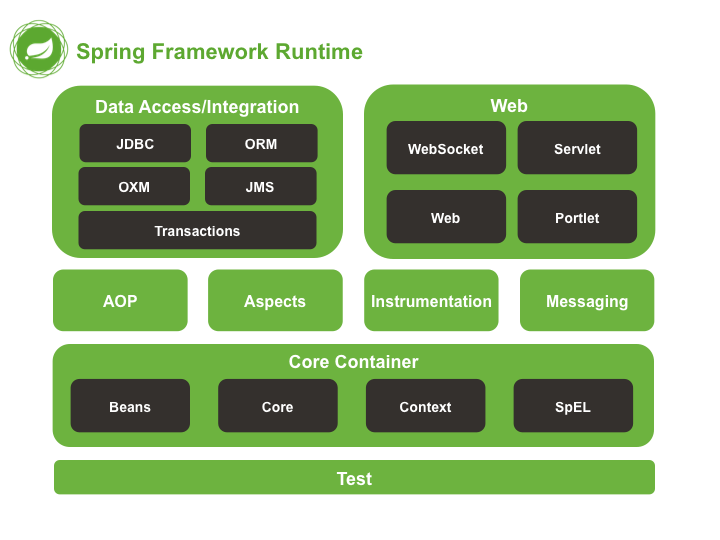
Spring主要模块

  • Spring Core: 基础,可以说 Spring 其他所有的功能都需要依赖于该类库。主要提供 IoC 依赖注入功能。
  • Spring Aspects : 该模块为与AspectJ的集成提供支持。
  • Spring AOP :提供了面向切面的编程实现。
  • Spring JDBC : Java数据库连接。
  • Spring JMS :Java消息服务。
  • Spring ORM : 用于支持Hibernate等ORM工具。
  • Spring Web : 为创建Web应用程序提供支持。
  • Spring Test : 提供了对 JUnit 和 TestNG 测试的支持。

3. @RestController vs @Controller

@Controller 返回一个页面

单独使用 @Controller 不加 @ResponseBody的话一般使用在要返回一个视图的情况,这种情况属于比较传统的Spring MVC 的应用,对应于前后端不分离的情况。
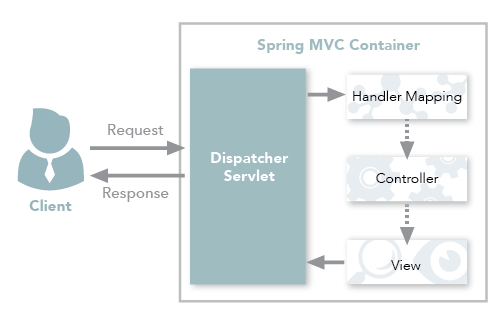
SpringMVC 传统工作流程

@RestController 返回JSON 或 XML 形式数据

@RestController只返回对象,对象数据直接以 JSON 或 XML 形式写入 HTTP 响应(Response)中,这种情况属于 RESTful Web服务,这也是目前日常开发所接触的最常用的情况(前后端分离)。
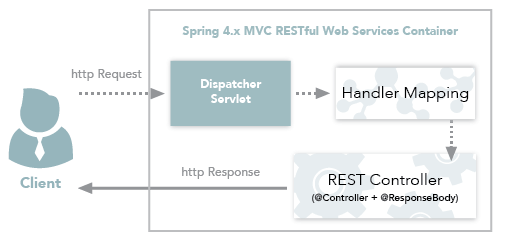
SpringMVC+RestController

@Controller +@ResponseBody 返回JSON 或 XML 形式数据

如果你需要在Spring4之前开发 RESTful Web服务的话,你需要使用@Controller 并结合@ResponseBody注解,也就是说@Controller +@ResponseBody= @RestController(Spring 4 之后新加的注解)。

@ResponseBody 注解的作用是将 Controller 的方法返回的对象通过适当的转换器转换为指定的格式之后,写入到HTTP 响应(Response)对象的 body 中,通常用来返回 JSON 或者 XML 数据,返回 JSON 数据的情况比较多。
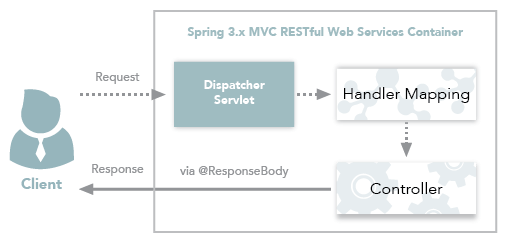
Spring3.xMVC RESTfulWeb服务工作流程

Reference:

4. Spring IOC & AOP

4.1 谈谈自己对于 Spring IoC 和 AOP 的理解

IoC

IoC(Inverse of Control:控制反转)是一种设计思想,就是 将原本在程序中手动创建对象的控制权,交由Spring框架来管理。 IoC 在其他语言中也有应用,并非 Spring 特有。 IoC 容器是 Spring 用来实现 IoC 的载体, IoC 容器实际上就是个Map(key,value),Map 中存放的是各种对象。

将对象之间的相互依赖关系交给 IoC 容器来管理,并由 IoC 容器完成对象的注入。这样可以很大程度上简化应用的开发,把应用从复杂的依赖关系中解放出来。 IoC 容器就像是一个工厂一样,当我们需要创建一个对象的时候,只需要配置好配置文件/注解即可,完全不用考虑对象是如何被创建出来的。 在实际项目中一个 Service 类可能有几百甚至上千个类作为它的底层,假如我们需要实例化这个 Service,你可能要每次都要搞清这个 Service 所有底层类的构造函数,这可能会把人逼疯。如果利用 IoC 的话,你只需要配置好,然后在需要的地方引用就行了,这大大增加了项目的可维护性且降低了开发难度。

Spring 时代我们一般通过 XML 文件来配置 Bean,后来开发人员觉得 XML 文件来配置不太好,于是 SpringBoot 注解配置就慢慢开始流行起来。

推荐阅读:https://www.zhihu.com/question/23277575/answer/169698662

Spring IoC的初始化过程:

Spring IoC的初始化过程

IoC源码阅读

AOP

AOP(Aspect-Oriented Programming:面向切面编程)能够将那些与业务无关,却为业务模块所共同调用的逻辑或责任(例如事务处理、日志管理、权限控制等)封装起来,便于减少系统的重复代码降低模块间的耦合度,并有利于未来的可拓展性和可维护性

Spring AOP就是基于动态代理的,如果要代理的对象,实现了某个接口,那么Spring AOP会使用JDK Proxy,去创建代理对象,而对于没有实现接口的对象,就无法使用 JDK Proxy 去进行代理了,这时候Spring AOP会使用Cglib ,这时候Spring AOP会使用 Cglib 生成一个被代理对象的子类来作为代理,如下图所示:
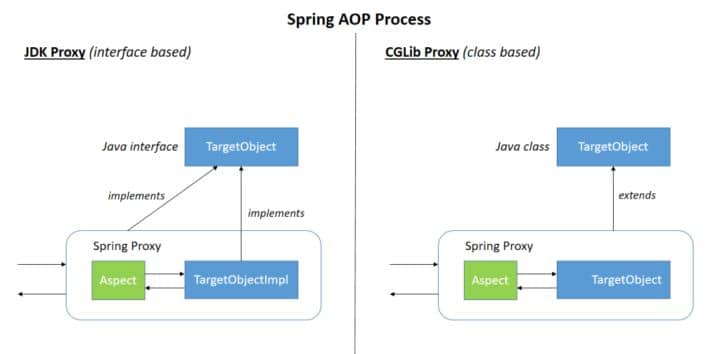
SpringAOPProcess

当然你也可以使用 AspectJ ,Spring AOP 已经集成了AspectJ ,AspectJ 应该算的上是 Java 生态系统中最完整的 AOP 框架了。

使用 AOP 之后我们可以把一些通用功能抽象出来,在需要用到的地方直接使用即可,这样大大简化了代码量。我们需要增加新功能时也方便,这样也提高了系统扩展性。日志功能、事务管理等等场景都用到了 AOP 。

4.2 Spring AOP 和 AspectJ AOP 有什么区别?

Spring AOP 属于运行时增强,而 AspectJ 是编译时增强。 Spring AOP 基于代理(Proxying),而 AspectJ 基于字节码操作(Bytecode Manipulation)。

Spring AOP 已经集成了 AspectJ ,AspectJ 应该算的上是 Java 生态系统中最完整的 AOP 框架了。AspectJ 相比于 Spring AOP 功能更加强大,但是 Spring AOP 相对来说更简单,

如果我们的切面比较少,那么两者性能差异不大。但是,当切面太多的话,最好选择 AspectJ ,它比Spring AOP 快很多。

5. Spring bean

5.1 Spring 中的 bean 的作用域有哪些?

  • singleton : 唯一 bean 实例,Spring 中的 bean 默认都是单例的。
  • prototype : 每次请求都会创建一个新的 bean 实例。
  • request : 每一次HTTP请求都会产生一个新的bean,该bean仅在当前HTTP request内有效。
  • session : 每一次HTTP请求都会产生一个新的 bean,该bean仅在当前 HTTP session 内有效。
  • global-session: 全局session作用域,仅仅在基于portlet的web应用中才有意义,Spring5已经没有了。Portlet是能够生成语义代码(例如:HTML)片段的小型Java Web插件。它们基于portlet容器,可以像servlet一样处理HTTP请求。但是,与 servlet 不同,每个 portlet 都有不同的会话

5.2 Spring 中的单例 bean 的线程安全问题了解吗?

大部分时候我们并没有在系统中使用多线程,所以很少有人会关注这个问题。单例 bean 存在线程问题,主要是因为当多个线程操作同一个对象的时候,对这个对象的非静态成员变量的写操作会存在线程安全问题。

常见的有两种解决办法:

  1. 在Bean对象中尽量避免定义可变的成员变量(不太现实)。
  2. 在类中定义一个ThreadLocal成员变量,将需要的可变成员变量保存在 ThreadLocal 中(推荐的一种方式)。

5.3 @Component 和 @Bean 的区别是什么?

  1. 作用对象不同: @Component 注解作用于类,而@Bean注解作用于方法。
  2. @Component通常是通过类路径扫描来自动侦测以及自动装配到Spring容器中(我们可以使用 @ComponentScan 注解定义要扫描的路径从中找出标识了需要装配的类自动装配到 Spring 的 bean 容器中)。@Bean 注解通常是我们在标有该注解的方法中定义产生这个 bean,@Bean告诉了Spring这是某个类的示例,当我需要用它的时候还给我。
  3. @Bean 注解比 @Component 注解的自定义性更强,而且很多地方我们只能通过 @Bean 注解来注册bean。比如当我们引用第三方库中的类需要装配到 Spring容器时,则只能通过 @Bean来实现。

@Bean注解使用示例:

1
2
3
4
5
6
7
8
@Configuration
public class AppConfig {
@Bean
public TransferService transferService() {
return new TransferServiceImpl();
}

}

上面的代码相当于下面的 xml 配置

1
2
3
<beans>
<bean id="transferService" class="com.acme.TransferServiceImpl"/>
</beans>

下面这个例子是通过 @Component 无法实现的。

1
2
3
4
5
6
7
8
9
10
11
@Bean
public OneService getService(status) {
case (status) {
when 1:
return new serviceImpl1();
when 2:
return new serviceImpl2();
when 3:
return new serviceImpl3();
}
}

5.4 将一个类声明为Spring的 bean 的注解有哪些?

我们一般使用 @Autowired 注解自动装配 bean,要想把类标识成可用于 @Autowired 注解自动装配的 bean 的类,采用以下注解可实现:

  • @Component :通用的注解,可标注任意类为 Spring 组件。如果一个Bean不知道属于哪个层,可以使用@Component 注解标注。
  • @Repository : 对应持久层即 Dao 层,主要用于数据库相关操作。
  • @Service : 对应服务层,主要涉及一些复杂的逻辑,需要用到 Dao层。
  • @Controller : 对应 Spring MVC 控制层,主要用户接受用户请求并调用 Service 层返回数据给前端页面。

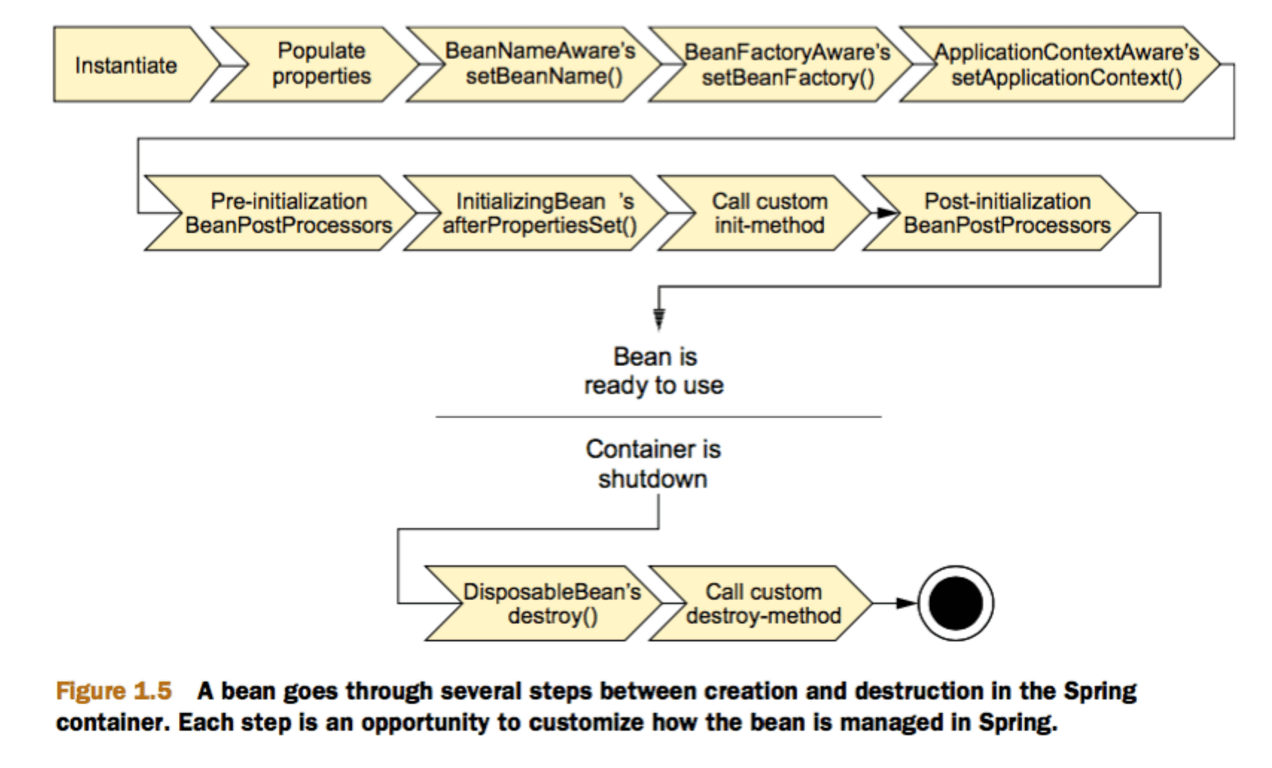
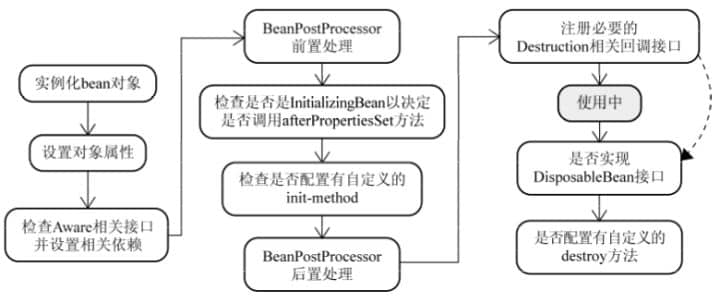
5.5 Spring 中的 bean 生命周期?

这部分网上有很多文章都讲到了,下面的内容整理自:https://yemengying.com/2016/07/14/spring-bean-life-cycle/ ,除了这篇文章,再推荐一篇很不错的文章 :https://www.cnblogs.com/zrtqsk/p/3735273.html

  • Bean 容器找到配置文件中 Spring Bean 的定义。
  • Bean 容器利用 Java Reflection API 创建一个Bean的实例。
  • 如果涉及到一些属性值 利用 set()方法设置一些属性值。
  • 如果 Bean 实现了 BeanNameAware 接口,调用 setBeanName()方法,传入Bean的名字。
  • 如果 Bean 实现了 BeanClassLoaderAware 接口,调用 setBeanClassLoader()方法,传入 ClassLoader对象的实例。
  • 与上面的类似,如果实现了其他 *.Aware接口,就调用相应的方法。
  • 如果有和加载这个 Bean 的 Spring 容器相关的 BeanPostProcessor 对象,执行postProcessBeforeInitialization() 方法
  • 如果Bean实现了InitializingBean接口,执行afterPropertiesSet()方法。
  • 如果 Bean 在配置文件中的定义包含 init-method 属性,执行指定的方法。
  • 如果有和加载这个 Bean的 Spring 容器相关的 BeanPostProcessor 对象,执行postProcessAfterInitialization() 方法
  • 当要销毁 Bean 的时候,如果 Bean 实现了 DisposableBean 接口,执行 destroy() 方法。
  • 当要销毁 Bean 的时候,如果 Bean 在配置文件中的定义包含 destroy-method 属性,执行指定的方法。

图示:

Spring Bean 生命周期

与之比较类似的中文版本:

Spring Bean 生命周期

6. Spring MVC

6.1 说说自己对于 Spring MVC 了解?

谈到这个问题,我们不得不提提之前 Model1 和 Model2 这两个没有 Spring MVC 的时代。

  • Model1 时代 : 很多学 Java 后端比较晚的朋友可能并没有接触过 Model1 模式下的 JavaWeb 应用开发。在 Model1 模式下,整个 Web 应用几乎全部用 JSP 页面组成,只用少量的 JavaBean 来处理数据库连接、访问等操作。这个模式下 JSP 即是控制层又是表现层。显而易见,这种模式存在很多问题。比如①将控制逻辑和表现逻辑混杂在一起,导致代码重用率极低;②前端和后端相互依赖,难以进行测试并且开发效率极低;
  • Model2 时代 :学过 Servlet 并做过相关 Demo 的朋友应该了解“Java Bean(Model)+ JSP(View,)+Servlet(Controller) ”这种开发模式,这就是早期的 JavaWeb MVC 开发模式。Model:系统涉及的数据,也就是 dao 和 bean。View:展示模型中的数据,只是用来展示。Controller:处理用户请求都发送给 ,返回数据给 JSP 并展示给用户。

Model2 模式下还存在很多问题,Model2的抽象和封装程度还远远不够,使用Model2进行开发时不可避免地会重复造轮子,这就大大降低了程序的可维护性和复用性。于是很多JavaWeb开发相关的 MVC 框架应运而生比如Struts2,但是 Struts2 比较笨重。随着 Spring 轻量级开发框架的流行,Spring 生态圈出现了 Spring MVC 框架, Spring MVC 是当前最优秀的 MVC 框架。相比于 Struts2 , Spring MVC 使用更加简单和方便,开发效率更高,并且 Spring MVC 运行速度更快。

MVC 是一种设计模式,Spring MVC 是一款很优秀的 MVC 框架。Spring MVC 可以帮助我们进行更简洁的Web层的开发,并且它天生与 Spring 框架集成。Spring MVC 下我们一般把后端项目分为 Service层(处理业务)、Dao层(数据库操作)、Entity层(实体类)、Controller层(控制层,返回数据给前台页面)。

Spring MVC 的简单原理图如下:
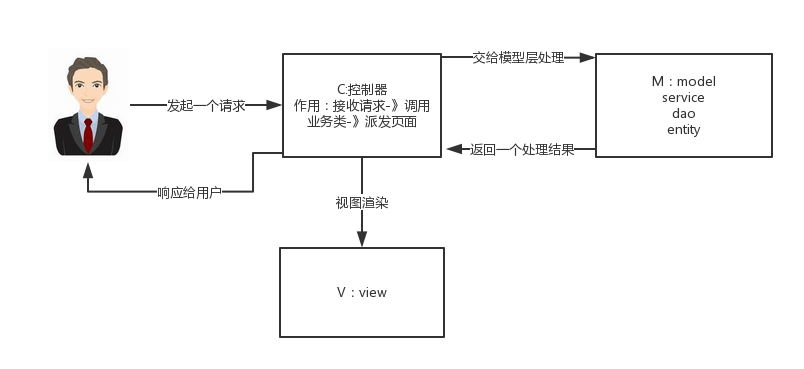
img

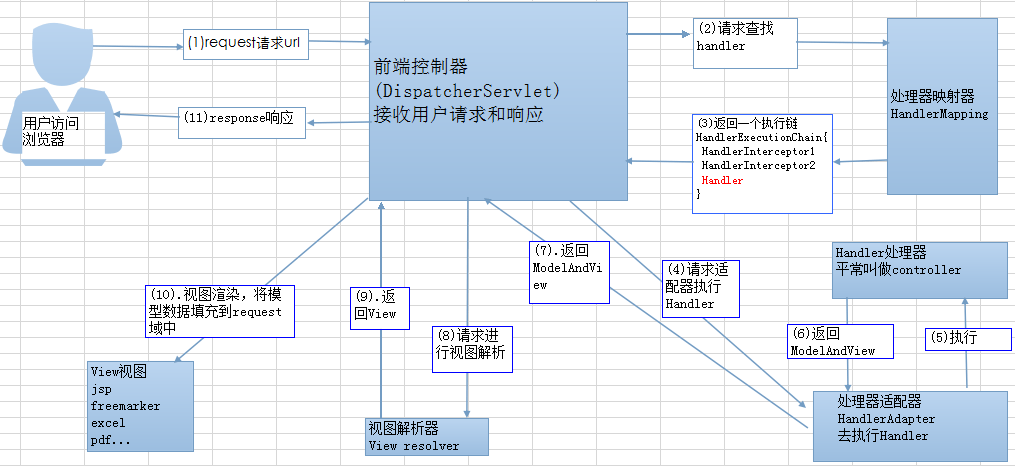
6.2 SpringMVC 工作原理了解吗?

原理如下图所示: SpringMVC运行原理

上图的一个笔误的小问题:Spring MVC 的入口函数也就是前端控制器 DispatcherServlet 的作用是接收请求,响应结果。

流程说明(重要):

  1. 客户端(浏览器)发送请求,直接请求到 DispatcherServlet
  2. DispatcherServlet 根据请求信息调用 HandlerMapping,解析请求对应的 Handler
  3. 解析到对应的 Handler(也就是我们平常说的 Controller 控制器)后,开始由 HandlerAdapter 适配器处理。
  4. HandlerAdapter 会根据 Handler来调用真正的处理器开处理请求,并处理相应的业务逻辑。
  5. 处理器处理完业务后,会返回一个 ModelAndView 对象,Model 是返回的数据对象,View 是个逻辑上的 View
  6. ViewResolver 会根据逻辑 View 查找实际的 View
  7. DispaterServlet 把返回的 Model 传给 View(视图渲染)。
  8. View 返回给请求者(浏览器)

7. Spring 框架中用到了哪些设计模式?

关于下面一些设计模式的详细介绍,可以看笔主前段时间的原创文章《面试官:“谈谈Spring中都用到了那些设计模式?”。》

  • 工厂设计模式 : Spring使用工厂模式通过 BeanFactoryApplicationContext 创建 bean 对象。
  • 代理设计模式 : Spring AOP 功能的实现。
  • 单例设计模式 : Spring 中的 Bean 默认都是单例的。
  • 模板方法模式 : Spring 中 jdbcTemplatehibernateTemplate 等以 Template 结尾的对数据库操作的类,它们就使用到了模板模式。
  • 包装器设计模式 : 我们的项目需要连接多个数据库,而且不同的客户在每次访问中根据需要会去访问不同的数据库。这种模式让我们可以根据客户的需求能够动态切换不同的数据源。
  • 观察者模式: Spring 事件驱动模型就是观察者模式很经典的一个应用。
  • 适配器模式 :Spring AOP 的增强或通知(Advice)使用到了适配器模式、spring MVC 中也是用到了适配器模式适配Controller
  • ……

8. Spring 事务

8.1 Spring 管理事务的方式有几种?

  1. 编程式事务,在代码中硬编码。(不推荐使用)
  2. 声明式事务,在配置文件中配置(推荐使用)

声明式事务又分为两种:

  1. 基于XML的声明式事务
  2. 基于注解的声明式事务

8.2 Spring 事务中的隔离级别有哪几种?

TransactionDefinition 接口中定义了五个表示隔离级别的常量:

  • TransactionDefinition.ISOLATION_DEFAULT: 使用后端数据库默认的隔离级别,Mysql 默认采用的 REPEATABLE_READ隔离级别 Oracle 默认采用的 READ_COMMITTED隔离级别.
  • TransactionDefinition.ISOLATION_READ_UNCOMMITTED: 最低的隔离级别,允许读取尚未提交的数据变更,可能会导致脏读、幻读或不可重复读
  • TransactionDefinition.ISOLATION_READ_COMMITTED: 允许读取并发事务已经提交的数据,可以阻止脏读,但是幻读或不可重复读仍有可能发生
  • TransactionDefinition.ISOLATION_REPEATABLE_READ: 对同一字段的多次读取结果都是一致的,除非数据是被本身事务自己所修改,可以阻止脏读和不可重复读,但幻读仍有可能发生。
  • TransactionDefinition.ISOLATION_SERIALIZABLE: 最高的隔离级别,完全服从ACID的隔离级别。所有的事务依次逐个执行,这样事务之间就完全不可能产生干扰,也就是说,该级别可以防止脏读、不可重复读以及幻读。但是这将严重影响程序的性能。通常情况下也不会用到该级别。

8.3 Spring 事务中哪几种事务传播行为?

支持当前事务的情况:

  • TransactionDefinition.PROPAGATION_REQUIRED: 如果当前存在事务,则加入该事务;如果当前没有事务,则创建一个新的事务。
  • TransactionDefinition.PROPAGATION_SUPPORTS: 如果当前存在事务,则加入该事务;如果当前没有事务,则以非事务的方式继续运行。
  • TransactionDefinition.PROPAGATION_MANDATORY: 如果当前存在事务,则加入该事务;如果当前没有事务,则抛出异常。(mandatory:强制性)

不支持当前事务的情况:

  • TransactionDefinition.PROPAGATION_REQUIRES_NEW: 创建一个新的事务,如果当前存在事务,则把当前事务挂起。
  • TransactionDefinition.PROPAGATION_NOT_SUPPORTED: 以非事务方式运行,如果当前存在事务,则把当前事务挂起。
  • TransactionDefinition.PROPAGATION_NEVER: 以非事务方式运行,如果当前存在事务,则抛出异常。

其他情况:

  • TransactionDefinition.PROPAGATION_NESTED: 如果当前存在事务,则创建一个事务作为当前事务的嵌套事务来运行;如果当前没有事务,则该取值等价于TransactionDefinition.PROPAGATION_REQUIRED。

8.4 @Transactional(rollbackFor = Exception.class)注解了解吗?

我们知道:Exception分为运行时异常RuntimeException和非运行时异常。事务管理对于企业应用来说是至关重要的,即使出现异常情况,它也可以保证数据的一致性。

@Transactional注解作用于类上时,该类的所有 public 方法将都具有该类型的事务属性,同时,我们也可以在方法级别使用该标注来覆盖类级别的定义。如果类或者方法加了这个注解,那么这个类里面的方法抛出异常,就会回滚,数据库里面的数据也会回滚。

@Transactional注解中如果不配置rollbackFor属性,那么事物只会在遇到RuntimeException的时候才会回滚,加上rollbackFor=Exception.class,可以让事物在遇到非运行时异常时也回滚。

关于 @Transactional注解推荐阅读的文章:

9. JPA

9.1 如何使用JPA在数据库中非持久化一个字段?

假如我们有有下面一个类:

1
2
3
4
5
6
7
8
9
10
11
12
13
14
15
16
17
Entity(name="USER")
public class User {

@Id
@GeneratedValue(strategy = GenerationType.AUTO)
@Column(name = "ID")
private Long id;

@Column(name="USER_NAME")
private String userName;

@Column(name="PASSWORD")
private String password;

private String secrect;

}

如果我们想让secrect 这个字段不被持久化,也就是不被数据库存储怎么办?我们可以采用下面几种方法:

1
2
3
4
5
static String transient1; // not persistent because of static
final String transient2 = “Satish”; // not persistent because of final
transient String transient3; // not persistent because of transient
@Transient
String transient4; // not persistent because of @Transient

一般使用后面两种方式比较多,我个人使用注解的方式比较多。

转载自:https://gitee.com/SnailClimb/JavaGuide/blob/master/docs/system-design/framework/spring/SpringInterviewQuestions.md

springboot中自动配置笔记

简介

刚开始学习springboot的时候有一些自动配置的细节笔记,记录一下

讲解

1、spring-boot-starter-parent

​ 在”pom.xml”文件当中,我们可以看到下面的配置

1
2
3
4
5
6
<parent>
<groupId>org.springframework.boot</groupId>
<artifactId>spring-boot-starter-parent</artifactId>
<version>2.2.6.RELEASE</version>
<relativePath/> <!-- lookup parent from repository -->
</parent>

​ 这个是springboot的父项目,然后我们点击这个spring-boot-starter-parent,进入进去发现如下:

1
2
3
4
5
6
<parent>
<groupId>org.springframework.boot</groupId>
<artifactId>spring-boot-dependencies</artifactId>
<version>2.2.6.RELEASE</version>
<relativePath>../../spring-boot-dependencies</relativePath>
</parent>

​ 还有一个父项目(套娃),继续点击spring-boot-dependencies,向下拉可以发现各种各样的依赖版本:

spring自动配置01

结论:

spring-boot-dependencies是Spring Boot的版本仲裁中心,一般来说我们导入依赖是不需要写版本的,基本上的依赖版本都会在spring-boot-dependencies进行管理,方便我们进行开发。

2、spring-boot-starter(启动器)

​ 既然上面只是对版本进行管理,那么我们的依赖是怎么导入的呢?我们继续观察“pom.xml”,

我们可以看到这个依赖:

1
2
3
4
<dependency>
<groupId>org.springframework.boot</groupId>
<artifactId>spring-boot-starter-web</artifactId>
</dependency>

​ 可以看到spring-boot-starter-web跟上面的spring-boot-starter-parent只是相差的后面,一个是web一个是start,这个在springboot当中还是挺常见的。

我们点击spring-boot-starter-web,发现很多和web相关的依赖,例如:json、tomcat等:

spring自动配置02

结论:

​ spring-boot-starter是spring-boot场景启动器,而spring-boot-starter-web帮我们导入了web模块正常运行所依赖的组件,其中依赖的版本都由spring-boot-starter-parent帮助我们进行仲裁。

​ 类似的其实spring boot将所有功能场景都抽取了出来,做成了一个个starts,当我们需要什么时,只需要在项目当中引入这些starter就能将相关场景的依赖都导入进来,并且版本都不需要我们进行控制,因为版本在spring-boot-starter-parent当中就已经被控制了,所以说非常方便。比如说我们需要邮件开发的场景,我们就只需要导入spring-boot-starter-mail,他就把相对应的依赖导入进来。starters介绍的官方文档:传送门

3、主程序入口类

​ 主程序入口类是这样:

1
2
3
4
5
6
7
8
@SpringBootApplication
public class SpringBoot01HelloworldQuickApplication {

public static void main(String[] args) {
SpringApplication.run(SpringBoot01HelloworldQuickApplication.class, args);
}

}

其中@SpringBootApplication:

​ Spring Boot应用标注在某个类上说明这个类是SpringBoot的主配置类,SpringBoot 就应该运行这个类的main方法来启动SpringBoot应用。

我们点开@SpringBootApplication,发现

1
2
3
4
5
6
7
8
9
10
11
12
13
14
15
16
17
18
@Target({ElementType.TYPE})
@Retention(RetentionPolicy.RUNTIME)
@Documented
@Inherited
@SpringBootConfiguration
@EnableAutoConfiguration
@ComponentScan(
excludeFilters = {@Filter(
type = FilterType.CUSTOM,
classes = {TypeExcludeFilter.class}
), @Filter(
type = FilterType.CUSTOM,
classes = {AutoConfigurationExcludeFilter.class}
)}
)
public @interface SpringBootApplication {
....
}

@SpringBootConfiguration

​ Spring Boot的配置类,标注在某个类上,表示这是一个Spring Boot的配置类。我们点击进去,会发现它是由@Configuration组成的,而@Configuration就是spring中的注解,标志一个配置类。

@EnableAutoConfiguration:

​ 开启自动配置功能,加上@EnableAutoConfiguration之后,springboot能够帮助我们自动配置这个注解,相当于开启自动配置功能。

@EnableAutoConfiguration具体是什么样的呢?我们点击@EnableAutoConfiguration进去,发现:

1
2
3
4
5
6
7
8
9
10
11
12
13
14
@Target({ElementType.TYPE})
@Retention(RetentionPolicy.RUNTIME)
@Documented
@Inherited
@AutoConfigurationPackage
@Import({AutoConfigurationImportSelector.class})
public @interface EnableAutoConfiguration {
String ENABLED_OVERRIDE_PROPERTY = "spring.boot.enableautoconfiguration";

Class<?>[] exclude() default {};

String[] excludeName() default {};
}

​ 我们又发现了@AutoConfigurationPackage这个注解,我们继续点击进去发现:

1
2
3
@Inherited
@Import({Registrar.class})
public @interface AutoConfigurationPackage {}

​ 我们发现了spring的底层注解@Import,该注解的作用是给容器中导入一个组件,组件由括号中的内容决定。也说明了@AutoConfigurationPackage是由@Import中导入的这个类起作用。

​ 我们继续点击Registrar这个类,发现

1
2
3
4
5
6
7
8
9
10
11
12
static class Registrar implements ImportBeanDefinitionRegistrar, DeterminableImports {
Registrar() {
}

public void registerBeanDefinitions(AnnotationMetadata metadata, BeanDefinitionRegistry registry) {
AutoConfigurationPackages.register(registry, (new AutoConfigurationPackages.PackageImport(metadata)).getPackageName());
}

public Set<Object> determineImports(AnnotationMetadata metadata) {
return Collections.singleton(new AutoConfigurationPackages.PackageImport(metadata));
}
}

​ 我们在registerBeanDefinitions设置一个断点,然后调试

spring自动配置03

spring自动配置04

spring自动配置05

包结构:

包结构

​ 发现metadata传入的就是主类,而(new AutoConfigurationPackages.PackageImport(metadata))则是得到了主类所在的包。这其实也就说明了@AutoConfigurationPackage的作用:==将主配置类(@SpringBootApplication标注的类)的所在包及下面所有子包里面的所有组件扫描到Spring容器==

​ 接着我们发现在@AutoConfigurationPackage下面还有一个@Import({AutoConfigurationImportSelector.class})注解。我们点进AutoConfigurationImportSelector,发现这么一个函数

1
2
3
4
5
6
7
8
9
10
11
12
13
14
15
protected AutoConfigurationImportSelector.AutoConfigurationEntry getAutoConfigurationEntry(AutoConfigurationMetadata autoConfigurationMetadata, AnnotationMetadata annotationMetadata) {
if (!this.isEnabled(annotationMetadata)) {
return EMPTY_ENTRY;
} else {
AnnotationAttributes attributes = this.getAttributes(annotationMetadata);
List<String> configurations = this.getCandidateConfigurations(annotationMetadata, attributes);
configurations = this.removeDuplicates(configurations);
Set<String> exclusions = this.getExclusions(annotationMetadata, attributes);
this.checkExcludedClasses(configurations, exclusions);
configurations.removeAll(exclusions);
configurations = this.filter(configurations, autoConfigurationMetadata);
this.fireAutoConfigurationImportEvents(configurations, exclusions);
return new AutoConfigurationImportSelector.AutoConfigurationEntry(configurations, exclusions);
}
}

同理设置断点调试

spring自动配置07

发现124个自动配置类

spring自动配置08

​ 那么该类的功能就是将一些需要的配置类导入进来并且配置好,比如说我们需要aop功能,那么它就将aop的自动配置类org.springframework.boot.autoconfigure.aop.AopAutoConfiguration导入了进来,并且配置好。有了自动配置类,免去了我们手动编写配置注入功能组件等的工作。

​ 其实Spring Boot在启动的时候从类路径下的META-INF/spring.factories中获取EnableAutoConfiguration指定的值,将 这些值作为自动配置类导入到容器中,自动配置类就生效,帮我们进行自动配置工作;以前我们在spring中需要自己配置的东西,自动配置类都帮我们完成了。整体的配置都在spring-boot-autoconfigure-2.2.6.RELEASE.jar中(springboot版本不同,这个可能版本也会不同)

spring自动配置09

spring.factories文件内容:

spring自动配置10

发现了前面调试的相同的内容

然后我们打开AopAutoConfiguration:

spring自动配置11

里面都是一些和配置相关的内容

结论:

@EnableAutoConfiguration:

  • 利用@AutoConfigurationPackage将主配置类(@SpringBootApplication标注的类)的所在包及下面所有子包里面的所有组件扫描到Spring容器
  • 利用@Import({AutoConfigurationImportSelector.class})注解将xxxAutoConfiguration类加入到容器当中

4.以HttpEncodingAutoConfiguration为例讲解学习的到一些东西

首先我们需要找到这个类,我是使用idea按下ctrl+N就可以进行搜索

spring自动配置12

HttpEncodingAutoConfiguration的内容如下:

1
2
3
4
5
6
7
8
9
10
11
12
13
14
15
16
17
18
19
20
21
22
23
24
25
26
27
28
29
30
31
32
33
34
35
36
37
@Configuration(
proxyBeanMethods = false
)//表示配置类
@EnableConfigurationProperties({HttpProperties.class})//启动指定类的ConfigurationProperties功能,将配置文件中对应的值和HttpEncodingProperties绑定起来;并把HttpEncodingProperties加入到ioc容器中

@ConditionalOnWebApplication(
type = Type.SERVLET
)
@ConditionalOnClass({CharacterEncodingFilter.class})
@ConditionalOnProperty(
prefix = "spring.http.encoding",
value = {"enabled"},
matchIfMissing = true
)//判断配置文件中是否存在某个配置 spring.http.encoding.enabled;如果不存在,判断也是成立的,即使我们配置文件中不配置pring.http.encoding.enabled=true,也是默认生效的;
public class HttpEncodingAutoConfiguration {
private final Encoding properties;
//只有这一个构造函数
public HttpEncodingAutoConfiguration(HttpProperties properties) {
this.properties = properties.getEncoding();
}

@Bean
@ConditionalOnMissingBean
public CharacterEncodingFilter characterEncodingFilter() {
CharacterEncodingFilter filter = new OrderedCharacterEncodingFilter();
filter.setEncoding(this.properties.getCharset().name());
filter.setForceRequestEncoding(this.properties.shouldForce(org.springframework.boot.autoconfigure.http.HttpProperties.Encoding.Type.REQUEST));
filter.setForceResponseEncoding(this.properties.shouldForce(org.springframework.boot.autoconfigure.http.HttpProperties.Encoding.Type.RESPONSE));
return filter;
}

@Bean
public HttpEncodingAutoConfiguration.LocaleCharsetMappingsCustomizer localeCharsetMappingsCustomizer() {
return new HttpEncodingAutoConfiguration.LocaleCharsetMappingsCustomizer(this.properties);
}
...
}
  • 注解@Configuration,这个在这里有所讲解,就是给容器中添加组件,也对应了下面的@Bean注解

  • 注解@EnableConfigurationProperties({HttpProperties.class}),作用是启动指定类的ConfigurationProperties功能,将配置文件中对应的值和HttpEncodingProperties绑定起来;并把HttpEncodingProperties加入到ioc容器中,并且我们看到HttpEncodingAutoConfiguration只有一个构造函数,就是将HttpProperties传入。

  • 进入HttpProperties中,发现

    1
    2
    3
    4
    5
    6
    @ConfigurationProperties(
    prefix = "spring.http"
    )
    public class HttpProperties {
    ...
    }

    而注解@ConfigurationProperties作用就是将配置文件中的内容注入到bean当中,说白了就是通过配置文件对HttpProperties对应的属性进行配置,可以看这个这个。这就说明了我们可以通过配置文件对HttpProperties进行配置然后影响到HttpEncodingAutoConfiguration这个类

结论:

  • xxxxAutoConfigurartion:自动配置类,主要负责给给容器中添加组件
  • xxxxProperties:封装配置文件中相关属性
  • 可以通过在application.properties中编写xxxxProperties的属性从而对xxxxAutoConfigurartion进行一些配置

总结

​ springboot的底层帮组我们做了很多的配置,所以现在使用起来springboot比较简单,但是底层的原理还是需要知道一些的,也可以加深的理解。感觉看老师讲的挺好的但是自己来写又说不出来,可能是还是没有理解够吧。